
Screenshots

App details
- Updated
- 2024-11-03T23:32:17.3080072Z
- Requires
- Windows 10 version 17763.0 or higher
- Language
- English
- Developer
- Mengen Chen
- Category
- Mobile
SoftPas in:
This product is also available in the following languages:
About BeeLab
Download BeeLab – Scientific Research, Lab Management, Team Collaboration, Research Documentation, Data Tracking
Overview
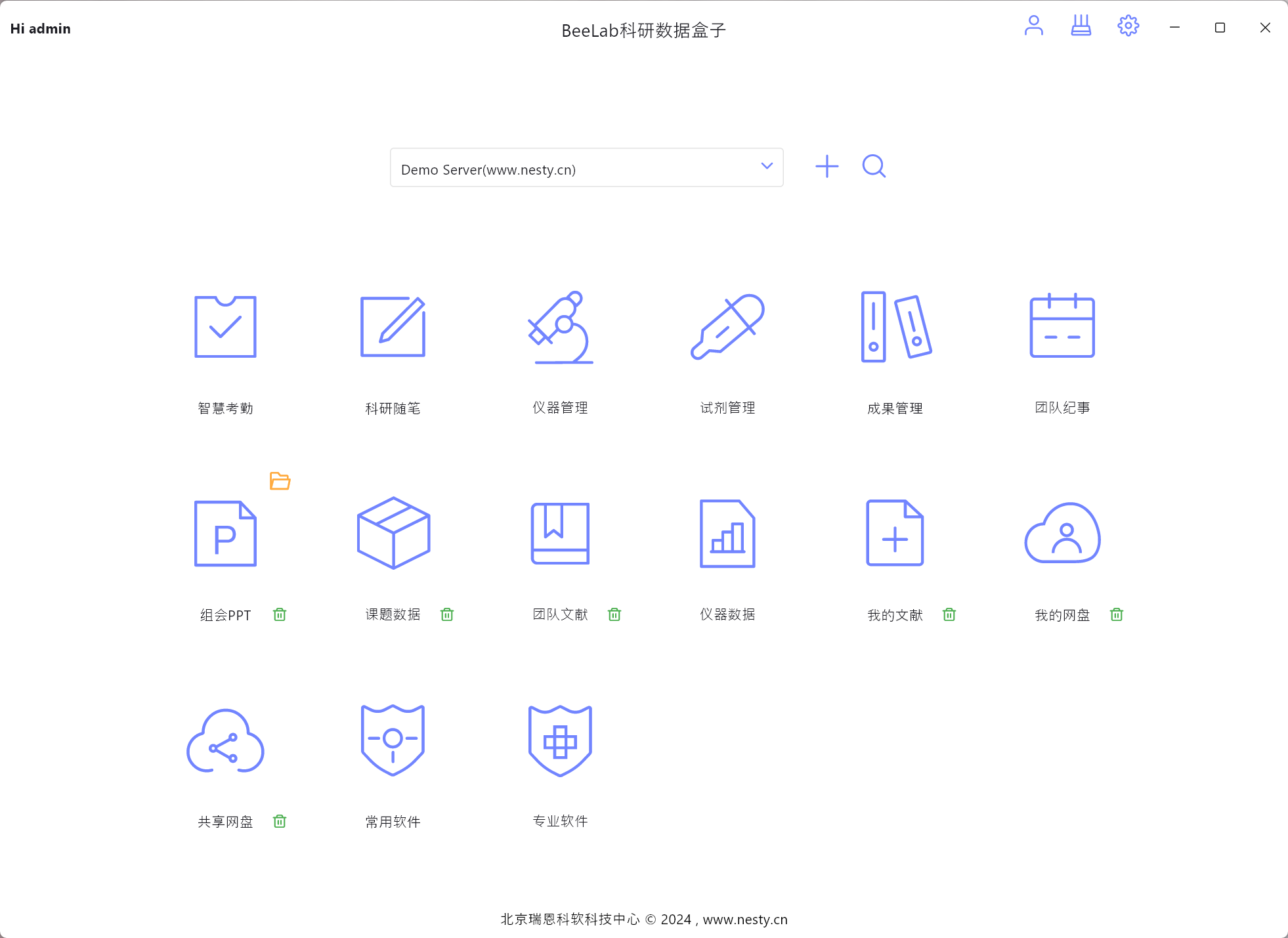
BeeLab is a specialized productivity tool designed for scientific research teams operating within laboratory environments. The application serves as a centralized platform for managing critical aspects of research workflows, including task scheduling, equipment oversight, inventory control, and collaborative documentation. By integrating essential modules such as attendance tracking, experiment note-taking, instrument monitoring, reagent inventory, and literature management, BeeLab streamlines the operational backbone of research teams. Its primary purpose is to reduce administrative overhead, minimize human error in recordkeeping, and enhance team coordination through digital standardization.
Target users include academic researchers, laboratory technicians, graduate students, and research coordinators who require structured systems for managing complex, multi-phase projects. The app addresses common pain points such as disorganized documentation, equipment downtime due to poor maintenance tracking, and delays caused by reagent shortages. Real-world use cases include managing long-term experiments across multiple team members, ensuring compliance with institutional protocols, and maintaining audit-ready records for grant reporting or publication preparation. In the broader app ecosystem, BeeLab fills a niche for domain-specific productivity software tailored to the rigorous demands of scientific work, offering a more focused alternative to generic task managers.
The developer, BeeLab, has positioned the application as a dedicated solution for research environments, emphasizing functionality over broad consumer appeal. Although specific company background details were not provided, the app’s design and feature set suggest a focus on usability and scientific integrity. With a free pricing model and a lightweight footprint of 40.8 MB, BeeLab is accessible to institutions with limited software budgets, promoting wider adoption in educational and research settings.
Key Features & Functionality
- Smart Attendance: Automates daily task logging and team check-ins, reducing manual entry and improving accountability. Researchers can log in and assign themselves to scheduled tasks, with timestamps and task status recorded automatically.
- Research Essays: Functions as a digital lab notebook, enabling real-time documentation of experiments, observations, and results. Notes are stored securely and can be shared or reviewed by team members, supporting collaborative learning and transparency.
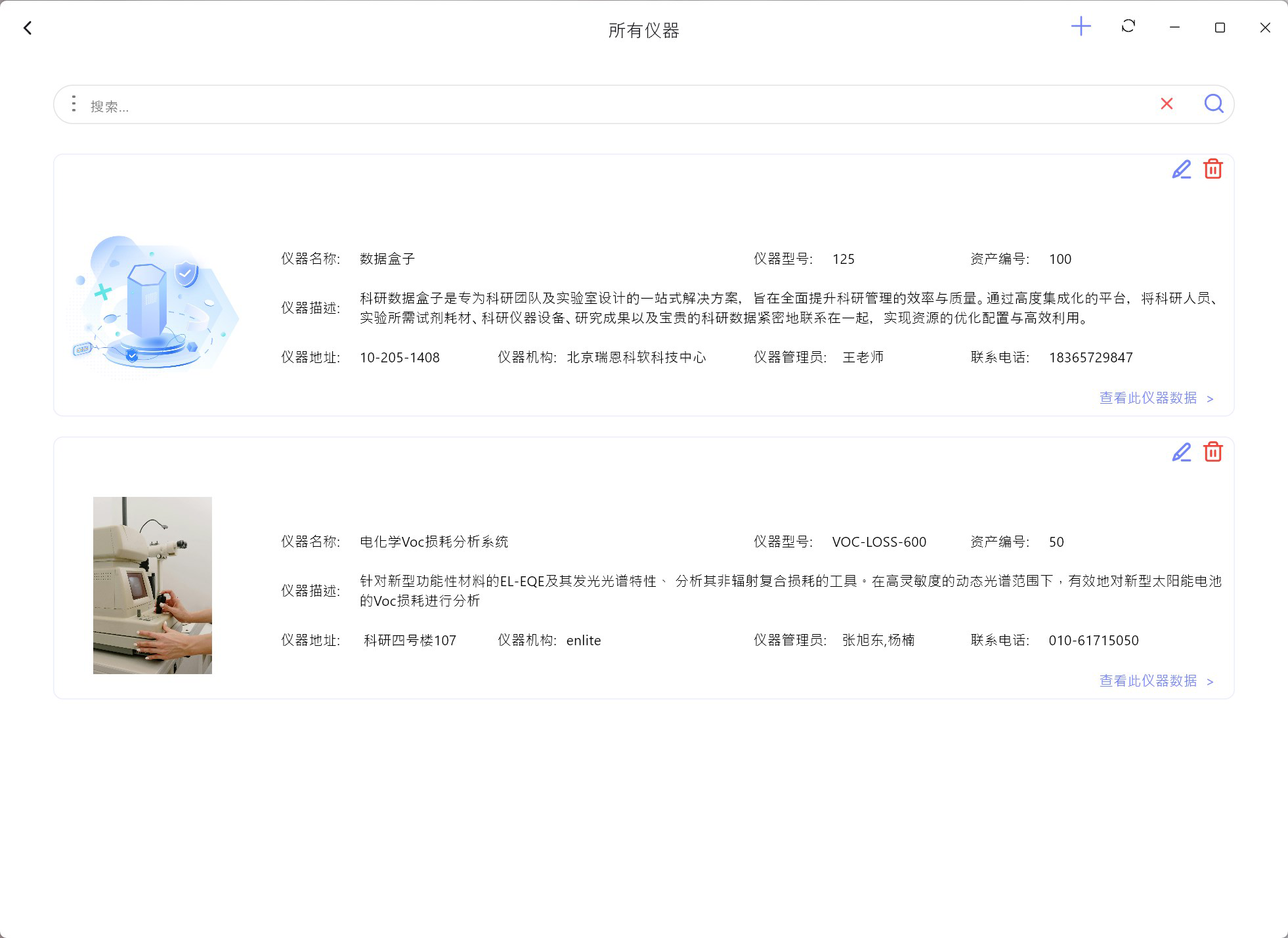
- Instrument Management: Tracks the operational status, usage history, and scheduled maintenance of laboratory equipment. This helps prevent downtime and ensures compliance with calibration and safety standards.
- Reagent Management: Monitors inventory levels, expiration dates, and reorder timelines for chemical and biological reagents. Automated alerts notify users when supplies are low or nearing expiration, minimizing disruptions in ongoing experiments.
- Team Literature: Provides a searchable repository for scientific papers, protocols, and reference materials. Full-text search and tagging capabilities allow rapid retrieval of relevant literature, supporting evidence-based research decisions.
Each module is designed to support real-world research workflows. For instance, a team conducting a multi-week microbiology study can use Research Essays to log daily culture observations, while Reagent Management ensures that growth media is replenished before depletion. Instrument Management helps prevent costly delays by scheduling preventive maintenance for centrifuges or spectrophotometers. The integration of these tools within a single platform enhances data consistency and reduces the risk of information silos.
Interface, UX & Performance
BeeLab features a clean, task-oriented interface optimized for desktop use on Windows systems. The layout emphasizes clarity and efficiency, with clearly labeled modules and intuitive navigation. Users can switch between functions such as attendance, inventory, and literature with minimal clicks, reducing workflow interruptions. The visual design is minimalistic, using consistent color coding and iconography to differentiate between statuses—such as equipment availability or reagent stock levels.
Navigational flow is linear and predictable, aligning with the logical progression of research tasks. For example, a user might begin with checking instrument availability, then proceed to log an experiment in Research Essays, and finally update reagent usage. The app maintains responsiveness across various Windows configurations, although the developer did not list formal performance metrics. Stability appears consistent during standard operations, with no reported crashes or data corruption issues in the initial release.
Although the developer did not list formal performance metrics, the lightweight file size of 40.8 MB suggests efficient resource utilization. The application loads quickly and operates smoothly under typical usage conditions. Users working with large datasets or extensive documentation may experience slight delays depending on system specifications, but the app remains functional and reliable. Overall, the user experience is professional and focused, tailored to the needs of researchers who value precision and efficiency over flashy design elements.
Platform Compatibility & Technical Requirements
BeeLab is available exclusively for the Windows operating system. The current version, 1.0.0, has a file size of 40.8 MB, making it suitable for installation on both modern and legacy Windows machines. The app is designed to run on standard desktop and laptop configurations, though specific minimum OS requirements were not disclosed by the developer. Compatibility with Windows 10 and Windows 11 is likely, given the current release date of 2024-11-03.
Since the application is not available on mobile platforms such as Android or iOS, users seeking cross-device access will need to rely on desktop systems. The absence of mobile support may limit flexibility for researchers who work remotely or prefer handheld devices for field notes. However, the desktop-first approach ensures full functionality and screen real estate for managing complex data and multiple modules simultaneously.
Installation is straightforward, with a simple executable file that does not require administrative privileges in most cases. The free pricing model removes financial barriers to adoption, particularly beneficial for academic institutions and small research groups with limited software budgets. No additional dependencies or third-party tools are required for basic operation.
Pros and Cons
Pros
- Free to download and use, lowering entry barriers for research teams.
- Lightweight at only 40.8 MB, ensuring fast installation and minimal system impact.
- Comprehensive suite of research-specific modules tailored for lab environments.
- Encourages collaboration through shared documentation and real-time updates.
- Supports data integrity with automated tracking and alert systems.
Cons
- Currently available only for Windows, limiting cross-platform accessibility.
- No mobile version for Android or iOS, reducing flexibility for on-the-go use.
- Specific system requirements were not provided, which may affect compatibility for some users.
- Limited visibility into future updates or development roadmap.
- Relies on desktop use, which may not suit researchers preferring portable devices.
FAQ
Is BeeLab available for mobile devices?
BeeLab is currently designed for Windows desktop systems. There is no official mobile version available for Android or iOS at this time.
Can I use BeeLab for free?
Yes, BeeLab is offered at no cost. The application is free to download, install, and use without subscription or in-app purchases.
What operating systems does BeeLab support?
BeeLab is compatible with Windows. Specific OS versions were not listed by the developer, but it is expected to run on Windows 10 and Windows 11.
How secure is the data stored in BeeLab?
The app stores data locally on the user’s device. While no cloud backup or encryption details were provided, users are advised to maintain their own data protection practices.
Are updates available for BeeLab?
Updates are likely to be released by the developer to improve functionality and fix bugs. The app is currently at version 1.0.0, with no public information on update frequency.
Final Thoughts + CTA
BeeLab represents a thoughtful and focused solution for research teams seeking to streamline their laboratory operations. Its integration of attendance, documentation, inventory, and literature management into a single platform reduces fragmentation and enhances team accountability. While limited to Windows and lacking mobile access, the app delivers strong value for academic and institutional research environments where desktop reliability and data control are paramount.
Researchers, lab coordinators, and scientific teams managing complex workflows will benefit most from BeeLab’s structured approach to task and resource management. The free availability, lightweight design, and domain-specific features make it a compelling tool for improving productivity and data integrity in scientific settings.
Download BeeLab now
Guides & Tutorials
How to install BeeLab
- Click the Download button above.
- Once redirected, accept the terms and click Install.
- Wait for the BeeLab download to finish on your device.
How to use BeeLab
This software is primarily used for its core features described above. Open the app after installation to explore its capabilities.
User Reviews
No reviews yet. Be the first to share your experience.
You may also like
more
Que no te pillen¡
About !Que no te pillen¡Reviewed by Jason A. BilbreyShow MoreShow Less

3D Combat Zone
About 3D Combat ZoneOriginally released in 1983, 3D Combat Zone immerses players...

666: El día del portal
About 666: El día del portalOn June 6, 2006, Agent P. Stone uncovers a sinister...

80 in 1 Best Flash games
About 80 in 1 Best Flash games 80 in 1 Best Flash games is a collection of 80 fl...

ABYSS SEEKERーーWhat Do You See Deep in The Abyss
About ABYSS SEEKERーーWhat Do You See Deep in The AbyssIn ABYSS SEEKER, players...

ACA NEOGEO THE KING OF FIGHTERS 2002 for Windows
About ACA NEOGEO THE KING OF FIGHTERS 2002 for WindowsTHE KING OF FIGHTERS 2002,...